Why I Used ChatGPT to Pick a Pool Robot (and Why HA Folks Might Care)

Bit of a tangent for Save the Panel, but there’s a Home Assistant thread in here, so stick with me.

After 20+ years dealing with various Polaris cleaners I finally reached the point of getting tired of it missing certain areas, and cleaning one step repeatedly. I therefore decided to jump to a cordless robot. I thought this would be a quick weekend of research. It was not.

The usual sources were nearly useless. Like with most product reviews - each YouTube reviewer has a different favorite, comparison articles are affiliate marketing with a thin coat of paint, some manufacturer websites (cough. Aiper. cough.) just show a huge product lineup where it is impossible to understand the differences. (And no decent comparison sheet existed.)

So, what does one do? Post to Reddit… maybe in a subreddit about pools…

I posted in one of the largest pool subreddits and found my post to be removed, since it doesn’t allow individual posts asking for robot recommendations. Instead, you have to drop your question into a megathread. Ok fine. Did that. And no one answered. Makes the group useless for this purpose. My opinion is that moderation policies like that show that the moderators have forgotten what their community is for, but I digress.

The best part is Reddit suggested other forums to post to but they were for robot home vacuums, not pool vacuums. Ugh.

I changed gears and opened ChatGPT.

I crafted a prompt as follows to start:

I need help. I’m looking at an Aiper pool robot. THey have so many models and no comparison chart. Can you help me understand the differences? I have a 16x32 inground pool with vinyl liner. I want cordless, long run time and ability to charge it only once per week.

Then I added the following to refine it:

no trees above. Most is grass clippings and leaf blow-in from landscapers visiting, and dirt wash in from the pavers around the pool. We do have custom inlaid steps and a seat in the deep end that is a challenge for our current Polaris robot.

please expand this to Aiper Maytronics and Wybot.

please create a comparison, but can you include a column that says if it has some level of Home Assistant or alarm.com integration?

You get the idea.

In the end, I gave it these actual specifics:

  • 16x32 vinyl liner, in-ground
  • Built-in bench, custom steps
  • No overhead trees, so no leaf load
  • Mostly grass clippings and dirt after the landscapers come through
  • Cordless
  • Real set-it-and-forget-it scheduling
  • Home Assistant integration if it exists

We spent about an hour going deep on Aiper, Dolphin (Maytronics), Beatbot, and WYBOT. Including battery replacement paths, parts availability, waterline behavior on vinyl, whether the “smart navigation” types, warranty realism, and what the community Home Assistant integrations look like for each. I even asked if any had alarm.com integration (spoiler - none of them did).

It created a rather elaborate comparison spreadsheet. (Link below). While this sheet is particular to my requirements, I thought it was good enough to share. I suppose you could upload this to your LLM of choice, change your requirements and have it update with then-current data to do the same for yourself.

Sharing it here if you want a copy:

Click Here to Access the Pool Robot Comparison Sheet

Why post this on Save the Panel

Because pool robots are quietly becoming connected devices. Some already have community HA integrations, others are getting there. Once one of these is in HA, the interesting automations follow:

  • Notify when the cycle finishes
  • Alert on low battery
  • Trigger a run the evening after the landscapers have been through
  • Empty-basket reminders
  • Cleaning status on the dashboard

None of that is necessary. It’s fun, which is enough. But it also allows for the continued consolidation of your home’s management in a single pane of glass.

What’s your experience?

Feel free to comment on your pool robot experiences below, and even post your custom spreadsheets. I’m curious how others are using AI to help with the shopping experience.


Update: I ended up going with the Aiper Scuba S3. Once I’ve lived with it for a season, I’ll post a full review, including whatever HA story it has (or doesn’t). (NOT an affiliate link… just a link. :slight_smile: )

-Darren

Update: After a week of using the Aiper

So far it cleans very well. However here are my biggest challenges thus far:

  1. Doesn’t seem to always follow the schedule
  2. Where do I charge it?
  3. Fire
  4. The Home Assistant Integration

Doesn’t seem to always follow the schedule

I’m confused by the directions, honestly.

I setup the schedule to clean 3 days per week (Mon, Wed, Fri) for 45 minutes each time. The first day I did this was a Thursday. I setup the schedule, which you have to do when the robot is on and connected to wifi, and then dropped it in the water. All good - it ran on Friday as it was supposed to.

So, then I pulled it out to charge over the weekend. I then just dropped it in the pool Sunday night.

Monday it didn’t run.

So, I pulled it out and ran a manual clean cycle - and I chose “floor only” thinking this would be a short clean. it wasn’t. It ran for over three hours until the battery was dead. Very strange.

I then pulled it out, charged it again. At this point I factory reset the unit and rejoined it to the app. I then set up the schedule again, and this time, while the unit was still connected, dropped it in the water. It ran all week according to the schedule, but now it’s Sunday and I’m about to charge it.

I suppose my question is, when I’m done charging do I have to do anything special so it remembers to run its schedule? I don’t know. I tried to reach out to support but their chat times weren’t convenient. I will try again to see if I can email them or something.

I need to know the proper charging procedure so the thing actually follows its schedule.

I’m afraid to turn it on before putting it in the water, because it seems to want to always do a manual clean when I do that. I wish it had a ‘start cycle’ button that was different than power on/off. Anyway, we shall see.

Where do I charge it?

The unit needs to be dry and indoors when charging. I don’t have a powered shed or anything near my pool to do this. My only option is to charge in my garage which is on the other side of the house, requiring me to drag it through the house (or around the whole property) to get it there.

I’m thinking of making a shelter for it (really don’t want to add a shed, etc) with power but it needs to be cool and out of the sun. I actually posted about this on a pool sub on Reddit but it got downvoted! Man those folks on Reddit are so freaking negative sometimes. Frustrating.

Fire

While on Reddit I came across someone asking me if this was an Aiper “because of all the fires”. Yikes. My AI research certainly didn’t say anything about that!

Come to find out this was with the older Aiper units - the Seagull - and the replacement for that recalled unit was the Scuba S1. (My new one is the S3.). I think I’m fine as these were fires while charging. My guess is Aiper learned there lesson and things are better - otherwise how are they still selling these? :slight_smile:

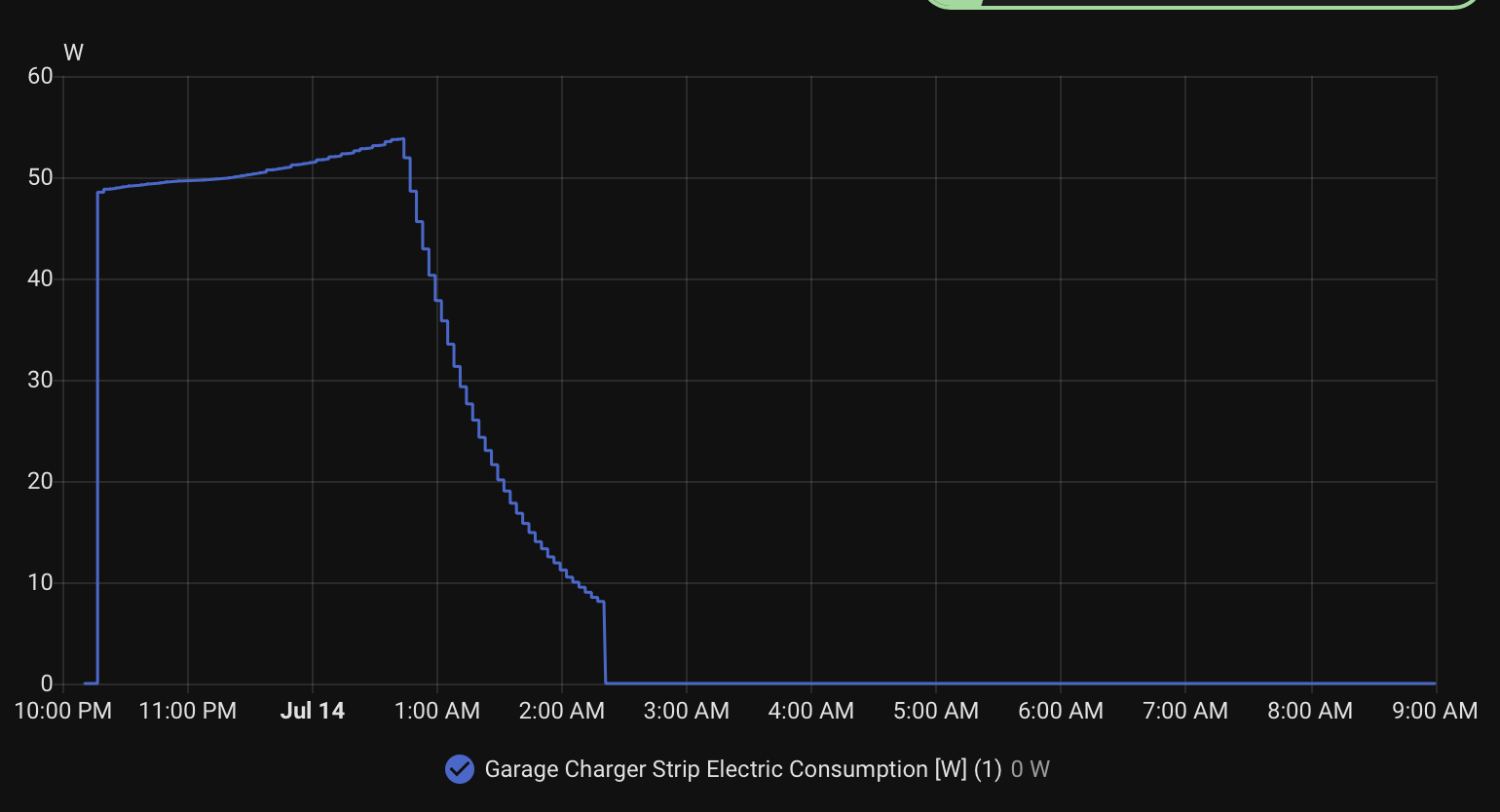
For now, I put the charger on a Zooz ZEN20 Power Strip, and measured the power draw during a charge cycle. I configured that plug on the ZEN20 to only have power when we are home, and once the charging ends, shut the power off to the charger. That way the unit can’t overcharge and won’t be constantly plugged in. (Which was reportedly part of the fire issue - overcharging and overheating; especially if charging in direct sun, which I’m not doing anyway.)

Charge cycle example for the Aiper Scuba S3:

Home Assistant Integration

I tried the Aiper integration from HACS (GitHub - kmich/ha-aiper: Home Assistant integration for Aiper pool cleaners (Scuba X1) — unofficial community project · GitHub). It is great work by the author, as they had to reverse engineer it (at least from my understanding), and it does work! The biggest issue is that the integration and the actual Aiper app can’t be connected at the same time.

This meant that as I was battling out the schedule issue with the Aiper, my app kept losing connection to the Aiper cloud and making me sign in again. I had to kill the HA integration so I could use the app reliably to program the Aiper. I wonder if perhaps that was why I had the scheduling difficulties earlier, but I can’t be sure. For now, I’m leaving this integration disabled until I can assure I know what I’m doing with the Aiper, and the schedule runs reliably.

In the meantime it would be great if Aiper would release a real API so reverse engineering wasn’t necessary. But my thanks to kmich on Github for taking the time to build the integration!

I’ll update this thread as the saga continues.